

Send Fiat
Withdraw fiat from a fiat wallet to your default merchant bank account.
Send Fiat withdraws fiat funds from a fiat wallet to your default merchant bank account. Unlike a crypto withdrawal (which lands on-chain in minutes), a fiat withdrawal moves through traditional banking rails — funds typically settle in 1–2 business days.
Send Fiat is enabled on requestSend Fiat is not turned on by default on every account. Availability depends on the fiat rails BEEM supports for your wallet currency, and the feature is enabled per-merchant after a setup conversation. If you do not see a Send fiat button on your Wallets page, contact your Solutions Manager.
How Send Fiat works
| Aspect | Behaviour |
|---|---|
| Source | A fiat wallet on your account — for example a EUR or USD wallet. Crypto wallets cannot be used as the source; convert to fiat first via Convert. |
| Destination | Your default merchant bank account — the pre-approved bank destination set during onboarding. The destination is fixed per merchant; you do not pick a different bank account per transaction. |
| Approval | Not subject to the approval policy. Because the destination is pre-approved and hardcoded into the withdrawal cycle, Send Fiat does not enter the Approvals queue. |
| Settlement time | Typically 1–2 business days, depending on the destination bank and the rail used. Crypto-fast it is not. |
| Debit timing | Your wallet is debited at submission — the wallet balance drops when the withdrawal is submitted. |
Send Fiat in the Portal
- Sign in to the Account Portal.
- Go to Wallets.
- Click Send fiat — either the button at the top of the Wallets page, or the Send fiat action on a specific wallet row. The Send fiat dialog opens.
- Complete the form:
| Field | Description |
|---|---|
| Wallet | The fiat wallet to draw from. Only fiat wallets appear in the dropdown. The wallet UUID is shown beneath the name for reference. |
| Amount | The amount to withdraw, denominated in the wallet's currency. |
| Account | The destination bank account. Set to your Default merchant account. |
| Reference | Your internal label for the withdrawal. Click the sparkle icon to auto-generate one. |
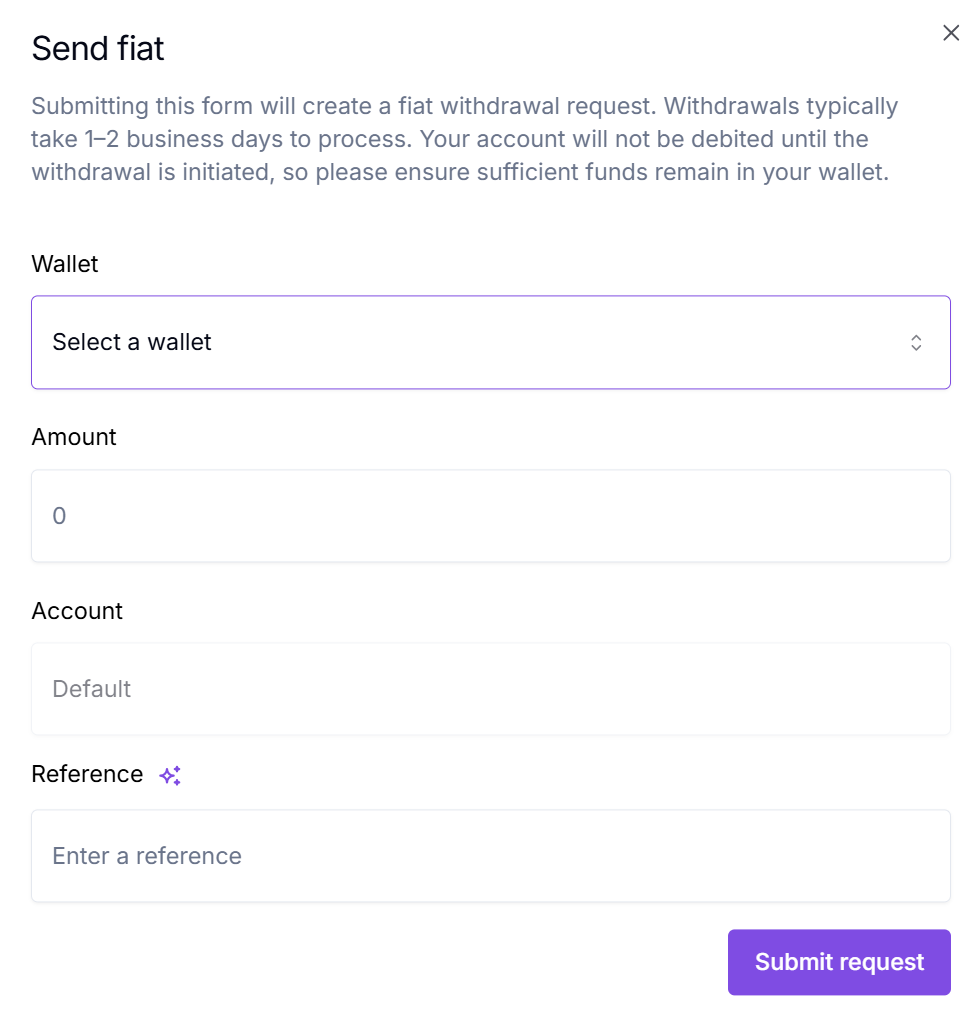
The Send fiat dialog. Wallet, amount, destination account, and reference.
- Click Submit request.
Your wallet is debited immediately on submission. The withdrawal is then processed through the banking rail; funds typically reach the destination account in 1–2 business days.
What's next
Hold and account for funds. Send Fiat only works from fiat wallets — confirm your source wallet is in a fiat currency.
Convert a crypto wallet's balance to a fiat wallet first if you need to send out funds you currently hold in crypto.
The crypto-rails equivalent — on-chain payout to a saved Contact or a one-time address.
Updated 5 months ago