
Authentication
Generation and use of authentication tokens on Beem
This guide explains how to generate and use RSA-based HTTP signatures to authenticate API requests securely. It ensures that requests are tamper-proof and trusted, relying only on cryptographic keys. This approach ensures more secure interactions with all payments API.
Generate RSA Keys for HTTP Signatures
To use HTTP signatures in your requests, you need an RSA key pair with:
- Private key. Use it to sign your requests. It must be stored securely in your system.
- Public key. Register it on the Account Portal to authenticate your requests. The public key will be used to register your client or share it during setup.
To create an RSA key pair:
- Run the following command to generate a private key:
openssl genrsa -out api-client-key.pem - Extract the public key from the private key:
openssl rsa -in api-client-key.pem -pubout -out api-client-public-key.pem
Best practice:
- Store private keys in secure hardware or vault solutions where only your application can access it.
- The public key will be used to register your client or share it during setup.
- Rotate keys periodically (for example, every 90 days) and automate rollover in your signer code.
The private key stays securely with your application, while the public key is registered with BEEM to authenticate your requests.
Add public key
Option 1: Add a new API Key to your Merchant Account
API Key to your Merchant AccountIf you already have a API Key attached to your account and associated with the public certificate, skip this and go to the next step.
To add an API Key to your Merchant Account, do the following:
-
Log in to your Account Portal.
-
Go to Settings > Clients, locate the required client, and click + Client.
-
Complete the following fields:
- Name: Enter the name for this record.
- Network whitelist: Enter the IP addresses for which the access must be provided and click Add.
To provide access to everyone, enter
0.0.0.0. - Public key: Paste your generated public key.
- Assign roles to user: Specify the required roles and permissions for different operations.
-
Click Add. The new client appears in the list.
Option 2: Configure your existing API Key
The above private key remains securely with your application, while the public key must be registered on the Account Portal to authenticate your requests.
If you have already added the public key, IP addresses, and roles to your Merchant Account, you can skip this step and go to Get your clientId.
After extracting your public RSA key, add it to your Account along with the IP addresses you require to be whitelisted:
-
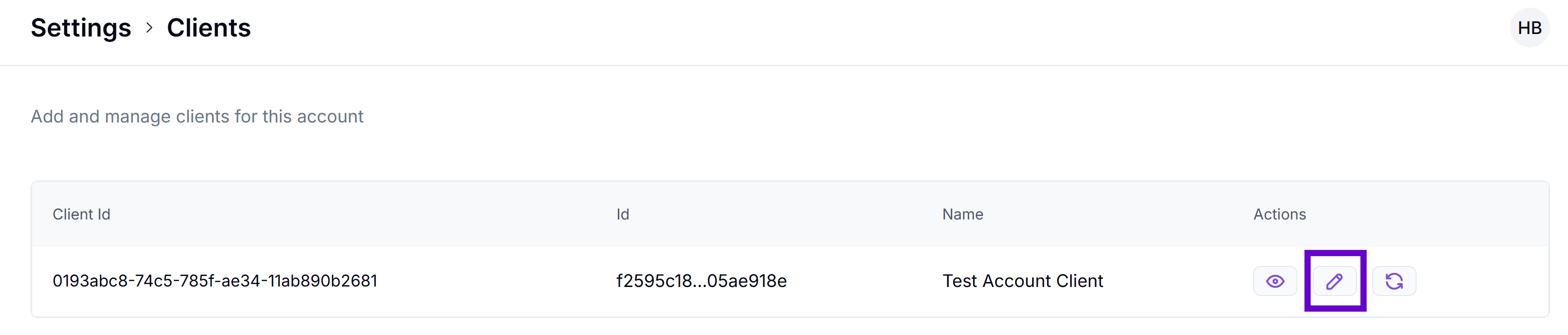
On the Account Portal, go to Settings > Clients, locate the required client, and click the Edit icon.
-
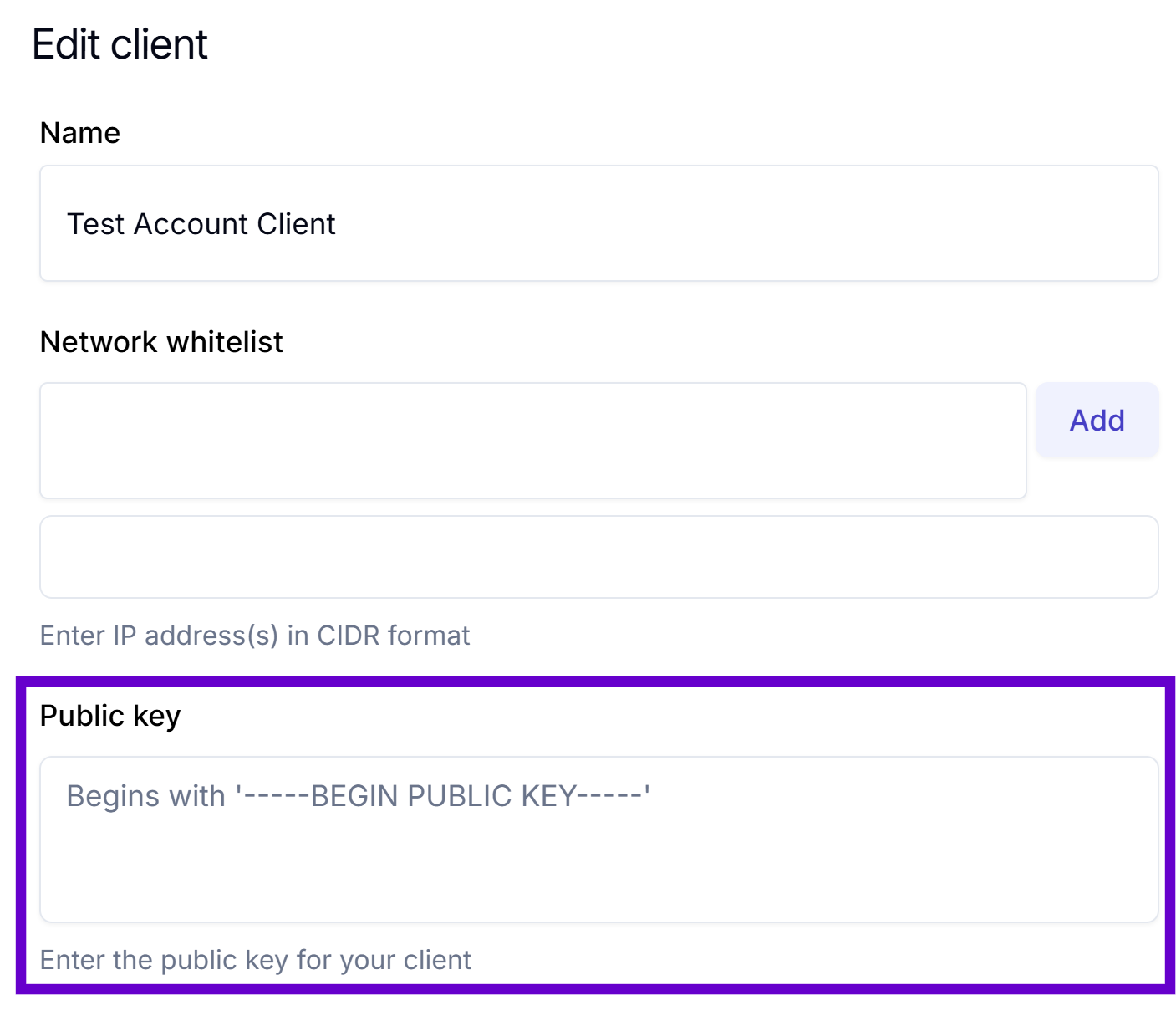
In the Public Key box, paste your generated public key.
-
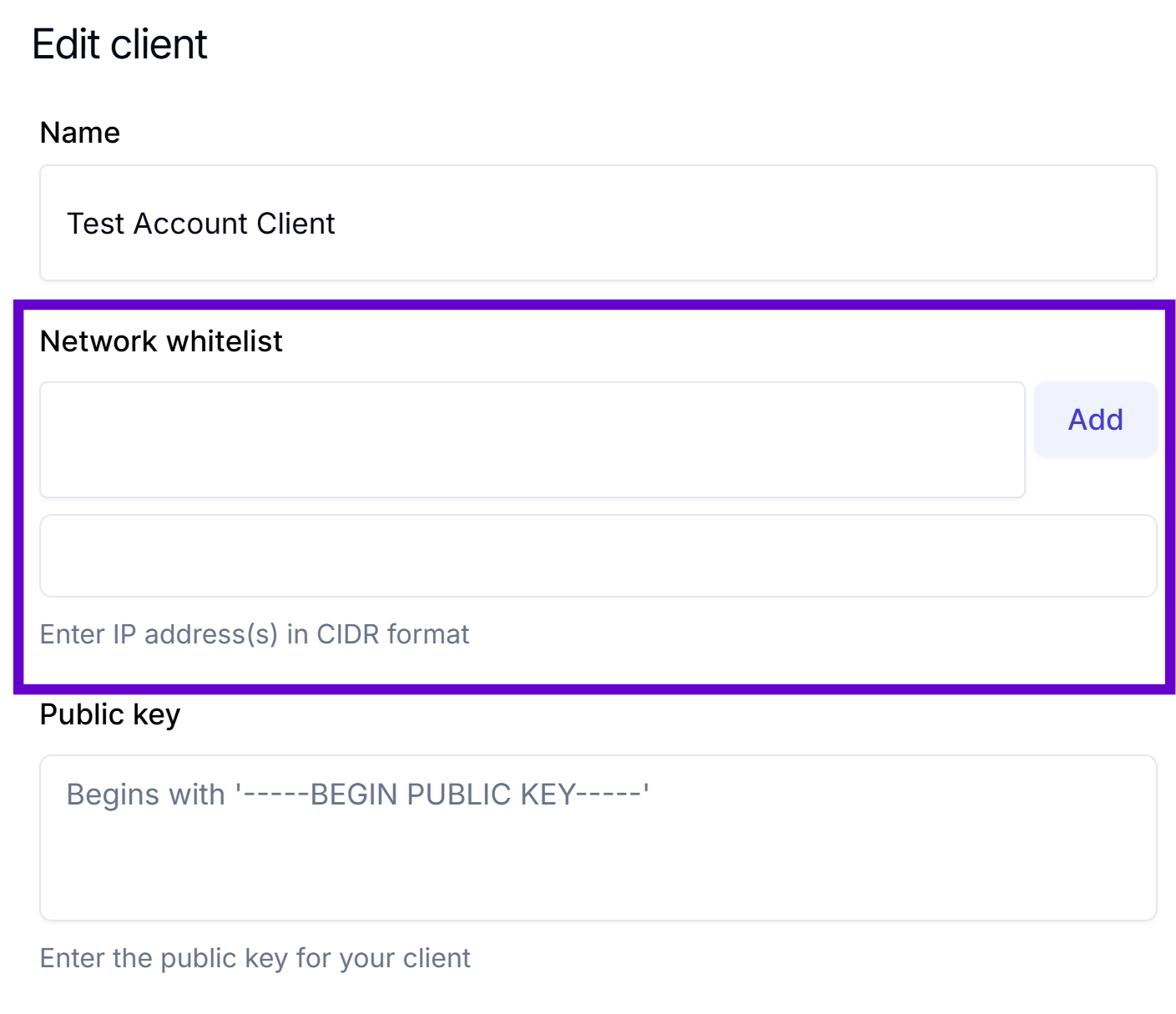
In the Network whitelist box, enter the IP addresses for which the access must be provided and click Add.
To provide access to everyone, enter
0.0.0.0. -
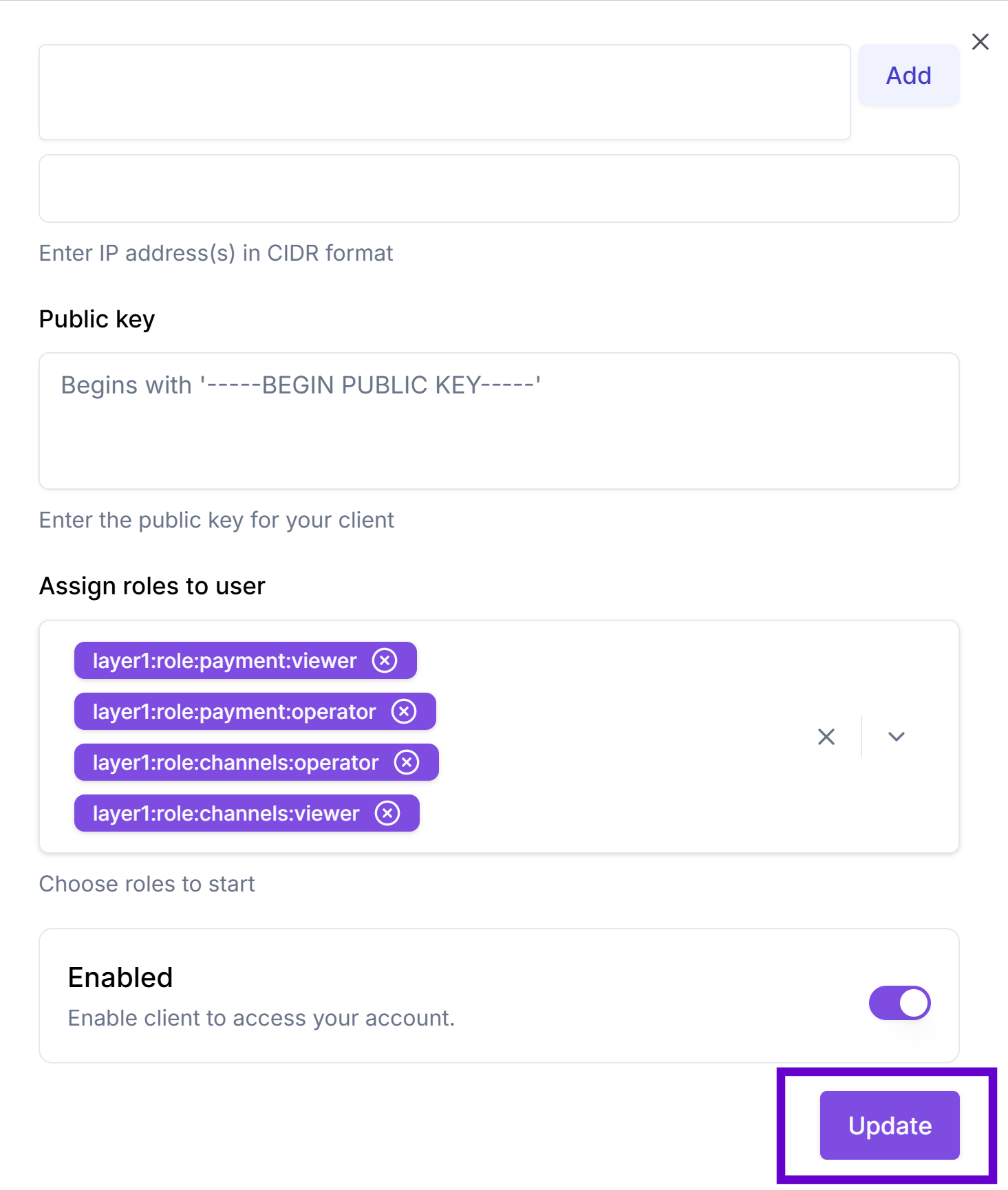
In the Assign roles to user, specify the required roles.
-
Click Update to save the changes.
Get your clientId
clientIdThe clientId parameter within the signature headers is crucial for identifying the key used to sign the request. When you generate the signature headers, the clientId value is set to match the public key registered on the Account Portal.
To get your clientId, do the following:
-
On your Account Portal, go to Settings > Clients and find the client to which you've just added the public key.
-
Click the icon to copy the required line.
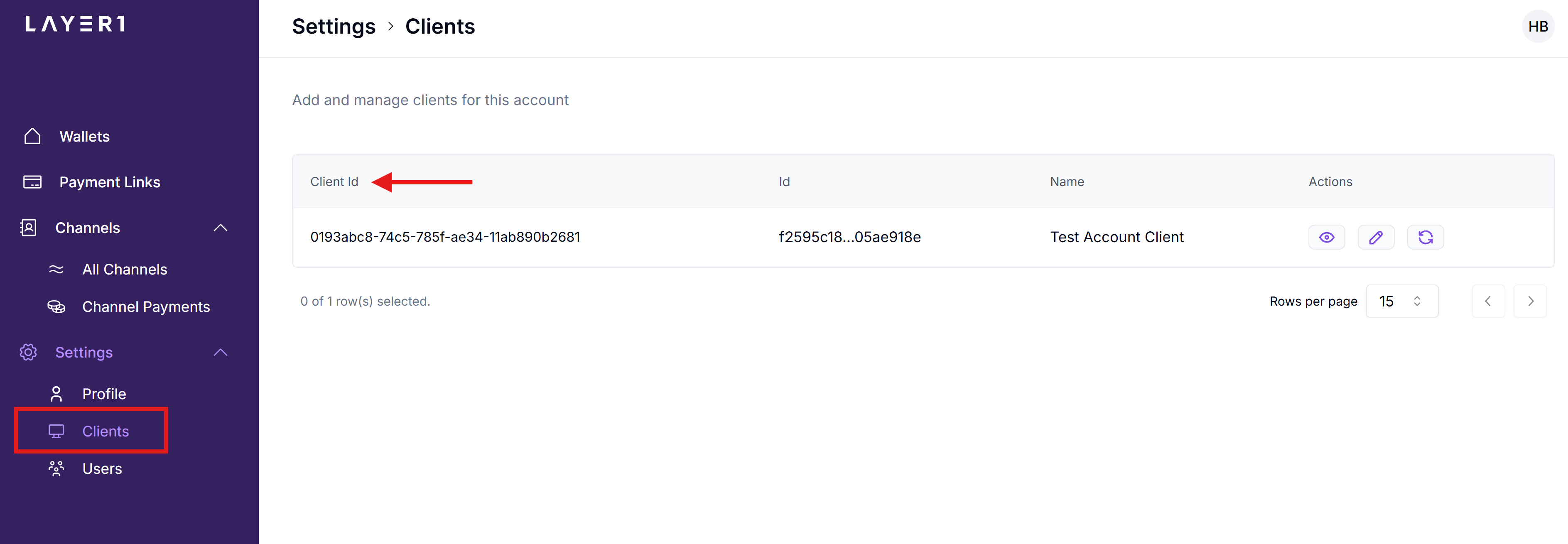
If you can't access the Clients section, request yourclientIdfrom your Solutions manager and ask them to add your public key and allowed IP addresses for your account.
2. Sign HTTP Requests
All requests must be signed based on the HTTP Message Signatures standard (RFC 9421). Each signature is a combination of the following HTTP components:
- HTTP method (
@method) - Request URL (
@target-uri) - Request body (
content-digest). The SHA-256 digest of the request body ensures that the data has not been tampered with - Timestamp (
date). Date header is also included to mitigate replay attacks by ensuring the request is recent.
The signature is constructed by:
- Selecting HTTP components (
@method,@target-uri,content-digest,date). - Creating a base string.
- Signing the string using your private key.
POST /api/transaction HTTP/1.1
Host: api.layer1.com
Date: Tue, 27 May 2025 10:21:54 GMT
Content-Type: application/json
Content-Digest: sha-256=:W6ph5Mm5Pz8GgiULbPgzG37mj9g=:
Signature-Input: sig=("@method" "@target-uri" "content-digest" "date");created=1716792114;keyid="client-123";alg="rsa-v1_5-sha256"
Signature: sig=:MEUCIQDn...==
You can now construct a request body with headers using your clientId and sign it with the generated public key. The following code block is an example of the class to sign your requests.
import java.io.IOException;
import java.net.URI;
import java.net.http.HttpClient;
import java.net.http.HttpRequest;
import java.net.http.HttpResponse;
import java.util.Map;
import java.security.InvalidKeyException;
import java.security.KeyFactory;
import java.security.MessageDigest;
import java.security.NoSuchAlgorithmException;
import java.security.PrivateKey;
import java.security.Signature;
import java.security.SignatureException;
import java.security.spec.PKCS8EncodedKeySpec;
import java.time.Instant;
import java.time.ZoneOffset;
import java.time.format.DateTimeFormatter;
import java.util.Base64;
import java.util.HashMap;
import java.util.Objects;
import java.util.Locale;


public class SignedRequestExample {

    private static final String SIGNATURE_ALGORITHM = "rsa-v1_5-sha256";
    private static final String DIGEST_ALGORITHM = "sha-256";
    private static final DateTimeFormatter HTTP_DATE_FORMATTER = DateTimeFormatter
            .ofPattern("EEE, dd MMM yyyy HH:mm:ss 'GMT'")
            .withZone(ZoneOffset.UTC)
            .withLocale(Locale.US);

    public static void main(String[] args) throws IOException, InterruptedException {
        // Example input
        String base64PrivateKey = """
                -----BEGIN PRIVATE KEY-----
                MIIEv...your key here...
                -----END PRIVATE KEY-----
                """; // Replace with your actual key (can be from env, file, etc.)

        String clientId = "YOUR_CLIENT_ID_HERE";
        String method = "POST";
        String url = "YOUR_API_URL";

        // JSON payload for creating a payment. Note: merchantId == walletId
        String payload = """
                {
                    "currency": "EUR",
                    "amount": "20",
                    "reference": "payment-lnk-aa01234f64er",
                    "merchantId": "dbb263a4-95d2-41f3-9267-c3fed559b6df", // also known as walletId
                    "expiryMinutes": "20",
                    "returnUrl": "https://yourwebsitename.com",
                    "type": "IN",
                    "payInDetails": {
                        "currency": "USDT"
                    }
                }
                """;

        HttpSigner signer = new HttpSigner(base64PrivateKey, clientId);
        Map<String, String> headers = signer.buildHeaders(url, payload, method);

        // Create the HTTP request
        HttpRequest.Builder requestBuilder = HttpRequest.newBuilder()
                .uri(URI.create(url))
                .header("Content-Type", "application/json")
                .method(method, HttpRequest.BodyPublishers.ofString(payload));

        // Add signature headers
        headers.forEach(requestBuilder::header);

        HttpClient client = HttpClient.newHttpClient();
        HttpResponse<String> response = client.send(
                requestBuilder.build(),
                HttpResponse.BodyHandlers.ofString()
        );

        // Output the response
        System.out.println("Status: " + response.statusCode());
        System.out.println("Body:\n" + response.body());
    }


    /**
     * Signs HTTP requests according to RFC 9421 using SHA256withRSA.
     */
    public static class HttpSigner {

        private static final String SIGNATURE_ALGORITHM = "rsa-v1_5-sha256";
        private static final String DIGEST_ALGORITHM = "sha-256";
        private final PrivateKey privateKey;
        private final String clientId;
        private static final DateTimeFormatter HTTP_DATE_FORMATTER = DateTimeFormatter
                .ofPattern("EEE, dd MMM yyyy HH:mm:ss 'GMT'")
                .withZone(ZoneOffset.UTC)
                .withLocale(Locale.US);

        /**
         * Constructor to load the private key from a Base64-encoded string.
         *
         * @param base64PrivateKey Base64-encoded private key string
         */
        public HttpSigner(String base64PrivateKey, String clientId) {
            this.clientId = clientId;
            this.privateKey = loadPrivateKey(base64PrivateKey);
        }

        /**
         * Load a PrivateKey object from a Base64-encoded string.
         */
        private PrivateKey loadPrivateKey(String key) {
            try {
                String preparedKey = prepareKey(key);
                KeyFactory keyFactory = KeyFactory.getInstance("RSA");
                return keyFactory.generatePrivate(
                        new PKCS8EncodedKeySpec(Base64.getDecoder().decode(preparedKey))
                );
            } catch (Exception e) {
                throw new RuntimeException("Failed to load private key", e);
            }
        }

        /**
         * This method builds the necessary signature headers and returns them as a map.
         *
         * @param url     The full URL of the request
         * @param payload The body of the request (if any, POST, etc)
         * @param method  The HTTP method of the request
         * @return A map containing the signature headers
         */
        public Map<String, String> buildHeaders(String url, String payload, String method) {
            Map<String, String> headerParams = new HashMap<>();

            String contentDigest = null;
            if (!Objects.isNull(payload) && !payload.isEmpty()) {
                try {
                    contentDigest = createDigest(DIGEST_ALGORITHM, payload);
                    headerParams.put("Content-Digest", contentDigest);
                } catch (NoSuchAlgorithmException e) {
                    throw new RuntimeException("Failed to create digest", e);
                }
            }

            Instant now = Instant.now();
            String dateHeader = HTTP_DATE_FORMATTER.format(now);
            headerParams.put("Date", dateHeader);
            long createdTimestamp = now.toEpochMilli() / 1000; // Unix timestamp in seconds
            String signatureParameters = createSignatureParameters(contentDigest, createdTimestamp);
            headerParams.put("Signature-Input", "sig=" + signatureParameters);
            try {
                String signatureBase = String.format(
                        "\"@method\": %s%n\"@target-uri\": %s%n%s\"date\": %s%n\"@signature-params\": %s",
                        method.toUpperCase(),
                        url,
                        contentDigest == null ? "" : "\"content-digest\": " + contentDigest + "\n",
                        dateHeader,
                        signatureParameters
                );

                headerParams.put("Signature",
                        String.format("sig=:%s:",
                                sign(signatureBase, privateKey)
                        )
                );
            } catch (Exception e) {
                throw new RuntimeException("Failed to sign request", e);
            }

            return headerParams;
        }

        /**
         * Remove the header and footer from the private key if generated via openssl, etc.
         *
         * @param rawKey The raw private key as a string
         * @return The prepared key without headers and footers
         */
        private String prepareKey(String rawKey) {
            String newKey = rawKey.replace("-----BEGIN PRIVATE KEY-----", "");
            newKey = newKey.replace("-----END PRIVATE KEY-----", "");
            return newKey.replaceAll("\\s+", "");
        }

        /**
         * Assemble the RFC 9421 signature parameters.
         *
         * @param contentDigest The digest of the content, if applicable
         * @param createdTimestamp The Unix timestamp (in seconds) when the signature was created.
         * @return The signature parameters as a string
         */
        private String createSignatureParameters(String contentDigest, long createdTimestamp) {
            StringBuilder components = new StringBuilder("(\"@method\" \"@target-uri\"");
            if (contentDigest != null) {
                components.append(" \"content-digest\"");
            }
            components.append(" \"date\"");

            return String.format("%s);created=%d;keyid=\"%s\";alg=\"%s\"",
                    components.toString(),
                    createdTimestamp,
                    clientId,
                    SIGNATURE_ALGORITHM
            );
        }

        /**
         * Sign the request using SHA256withRSA.
         *
         * @param signatureBase The base string to sign
         * @param privateKey    The private key to use for signing
         * @return The Base64-encoded signature
         * @throws NoSuchAlgorithmException If the algorithm is not available
         * @throws InvalidKeyException      If the key is invalid
         * @throws SignatureException       If the signing process fails
         */
        private String sign(String signatureBase, PrivateKey privateKey)
                throws NoSuchAlgorithmException, InvalidKeyException, SignatureException {
            Signature signer = Signature.getInstance("SHA256withRSA");
            signer.initSign(privateKey);
            signer.update(signatureBase.getBytes());
            return Base64.getEncoder().encodeToString(signer.sign());
        }

        /**
         * Create and prepare the digest for the content-digest header.
         *
         * @param digestAlgorithm The algorithm to use for the digest
         * @param data            The data to digest
         * @return The formatted digest string
         * @throws NoSuchAlgorithmException If the algorithm is not available
         */
        private String createDigest(String digestAlgorithm, String data) throws NoSuchAlgorithmException {
            return String.format("%s=:%s:", digestAlgorithm, getDigest(digestAlgorithm, data));
        }

        /**
         * Generate the digest using the specified algorithm.
         *
         * @param algorithm The algorithm to use
         * @param data      The data to digest
         * @return The Base64-encoded digest
         * @throws NoSuchAlgorithmException If the algorithm is not available
         */
        private String getDigest(String algorithm, String data) throws NoSuchAlgorithmException {
            MessageDigest digest = MessageDigest.getInstance(algorithm);
            byte[] hash = digest.digest(data.getBytes());
            return Base64.getEncoder().encodeToString(hash);
        }
    }
}
class HttpSigner {
private const SIGNATURE_ALGORITHM = 'rsa-v1_5-sha256';
private const DIGEST_ALGORITHM = 'sha-256';
private $privateKey;
private $clientId;
/**
* Constructor to load the private key from a Base64-encoded string.
*
* @param string $base64PrivateKey Base64-encoded private key string
* @param string $clientId Client ID for the keyid parameter
*/
public function __construct(string $base64PrivateKey, string $clientId) {
$this->clientId = $clientId;
$this->privateKey = $this->loadPrivateKey($base64PrivateKey);
}
/**
* Load a private key resource from a Base64-encoded string.
*
* @param string $key The private key string
* @return resource OpenSSL key resource
*/
private function loadPrivateKey(string $key) {
$preparedKey = $this->prepareKey($key);
$privateKey = openssl_pkey_get_private($preparedKey);
if ($privateKey === false) {
throw new RuntimeException('Failed to load private key: ' . openssl_error_string());
}
return $privateKey;
}
/**
* Remove the header and footer from the private key if needed.
*
* @param string $rawKey The raw private key as a string
* @return string The prepared key in PEM format
*/
private function prepareKey(string $rawKey): string {
// If key already has proper headers, return as is
if (strpos($rawKey, '-----BEGIN PRIVATE KEY-----') !== false) {
return $rawKey;
}
// Otherwise, clean and add headers
$cleanKey = preg_replace('/\s+/', '', $rawKey);
return "-----BEGIN PRIVATE KEY-----\n" .
chunk_split($cleanKey, 64, "\n") .
"-----END PRIVATE KEY-----\n";
}
/**
* Build the necessary signature headers and return them as an array.
*
* @param string $url The full URL of the request
* @param string|null $payload The body of the request (if any)
* @param string $method The HTTP method of the request
* @return array Associative array containing the signature headers
*/
public function buildHeaders(string $url, ?string $payload, string $method): array {
$headers = [];
$contentDigest = null;
if (!empty($payload)) {
$contentDigest = $this->createDigest(self::DIGEST_ALGORITHM, $payload);
$headers['Content-Digest'] = $contentDigest;
}
$now = time();
$dateHeader = gmdate('D, d M Y H:i:s', $now) . ' GMT';
$headers['Date'] = $dateHeader;
$signatureParameters = $this->createSignatureParameters($contentDigest, $now);
$headers['Signature-Input'] = 'sig=' . $signatureParameters;
$signatureBase = sprintf(
"\"@method\": %s\n\"@target-uri\": %s\n%s\"date\": %s\n\"@signature-params\": %s",
strtoupper($method),
$url,
$contentDigest === null ? '' : "\"content-digest\": " . $contentDigest . "\n",
$dateHeader,
$signatureParameters
);
$signature = $this->sign($signatureBase);
$headers['Signature'] = sprintf('sig=:%s:', $signature);
return $headers;
}
/**
* Assemble the RFC 9421 signature parameters.
*
* @param string|null $contentDigest The digest of the content, if applicable
* @param int $createdTimestamp The Unix timestamp (in seconds) when the signature was created
* @return string The signature parameters as a string
*/
private function createSignatureParameters(?string $contentDigest, int $createdTimestamp): string {
$components = '("@method" "@target-uri"';
if ($contentDigest !== null) {
$components .= ' "content-digest"';
}
$components .= ' "date"';
return sprintf(
'%s);created=%d;keyid="%s";alg="%s"',
$components,
$createdTimestamp,
$this->clientId,
self::SIGNATURE_ALGORITHM
);
}
/**
* Sign the request using SHA256withRSA.
*
* @param string $signatureBase The base string to sign
* @return string The Base64-encoded signature
*/
private function sign(string $signatureBase): string {
$signature = '';
$success = openssl_sign(
$signatureBase,
$signature,
$this->privateKey,
OPENSSL_ALGO_SHA256
);
if (!$success) {
throw new RuntimeException('Failed to sign request: ' . openssl_error_string());
}
return base64_encode($signature);
}
/**
* Create and prepare the digest for the content-digest header.
*
* @param string $digestAlgorithm The algorithm to use for the digest
* @param string $data The data to digest
* @return string The formatted digest string
*/
private function createDigest(string $digestAlgorithm, string $data): string {
return sprintf('%s=:%s:', $digestAlgorithm, $this->getDigest($digestAlgorithm, $data));
}
/**
* Generate the digest using the specified algorithm.
*
* @param string $algorithm The algorithm to use (e.g., 'sha-256')
* @param string $data The data to digest
* @return string The Base64-encoded digest
*/
private function getDigest(string $algorithm, string $data): string {
// Convert 'sha-256' to 'sha256' for PHP's hash function
$phpAlgorithm = str_replace('-', '', $algorithm);
$hash = hash($phpAlgorithm, $data, true);
return base64_encode($hash);
}
/**
* Destructor to free the private key resource.
*/
public function __destruct() {
if (is_resource($this->privateKey)) {
openssl_free_key($this->privateKey);
}
}
}Use signed headers in API requests
Once the headers are generated, they should be attached to your HTTP request. These headers will allow the server to verify the signature using the corresponding public key that you registered Beem.
// Instantiate the http signer
HttpSigner signer = new HttpSigner(privateKey, clientId);

// Generate the signature headers
Map<String, String> headers = signer.buildHeaders(url, body, method);
$signer = new HttpSigner($base64PrivateKey, $clientId);
$headers = $signer->buildHeaders($url, $payload, $method);Here,
base64PrivateKey: Your base64-encoded RSA private key in the PKCS#8 format.clientId: Your key identifier registered and visible in the Account Portal.url: Full API endpoint address you're calling, for example, <https://beem-qpnq.readme.io/openapi/663b2cf0eb5c5c004293d196>.payload: Request body. Required for POST, PUT, and so on.method: HTTP method, for example, "POST", "GET".
The headers map returned by HttpSigner#buildHeaders(...) includes:
Content-Digest: SHA-256 hash of the payload. Only present for requests with a body.Date: Current timestamp in the HTTP date format (RFC 7231).Signature-Input: Metadata describing the signed components ("@method","@target-uri", etc.).Signature: The final Base64-encoded digital signature (using SHA256withRSA).
Troubleshooting
If the signature fails validation, the primary issue may be with the payload and headers.
In this case, verify that you have done the following:
- Correctly acquired and specified your
clientID. - Uploaded your public key (not private one) to the account.
- Ensured there are no typos or other errors in the payload.
- Ensured the signed headers are added to the request.
- Ensured that your request was constructed according to our documentation.
Updated 6 months ago